Network Design & Management
Structured cabling, Ubiquiti WiFi, VLANs, hybrid networks — engineered for teams of 1 to 300, then actively managed so they stay that way.
From a single-office LAN to a multi-site network, we design, install and manage the whole stack for teams of 5 to 300 — starting with a proper site survey and ending with documented, monitored infrastructure that just works.
- 5–300 users
- Site survey first
- 24/7 monitoring
 Ubiquiti
UniFi
Enterprise networking, sized for your office.
Ubiquiti UniFi is our primary network platform. Gateways, switches and Wi-Fi work as one system, managed from one console — so your network is fast, secure and supported remotely by our team.
One console, every site
Every gateway, switch and access point visible in one place, so we can see and fix issues remotely.
Business Wi-Fi that roams
Seamless roaming between access points, so calls and video don’t drop as people move around.
Managed PoE switching
Power access points, desk phones and cameras straight from the switch — fewer adapters, tidier desks.
VLANs & segmentation
Staff, guests, phones and CCTV kept on separate networks, so one problem can’t spread to the rest.
Gateway firewall & IDS/IPS
Threat detection at the edge of your network, with traffic rules and content filtering.
Guest Wi-Fi portal
A branded guest network with its own login page, fully isolated from your business systems.
Site-to-site & remote VPN
Offices linked securely, and staff connect from home to the systems they need.
Monitoring & alerts
If a device drops offline or needs an update, we know about it — usually before you do.
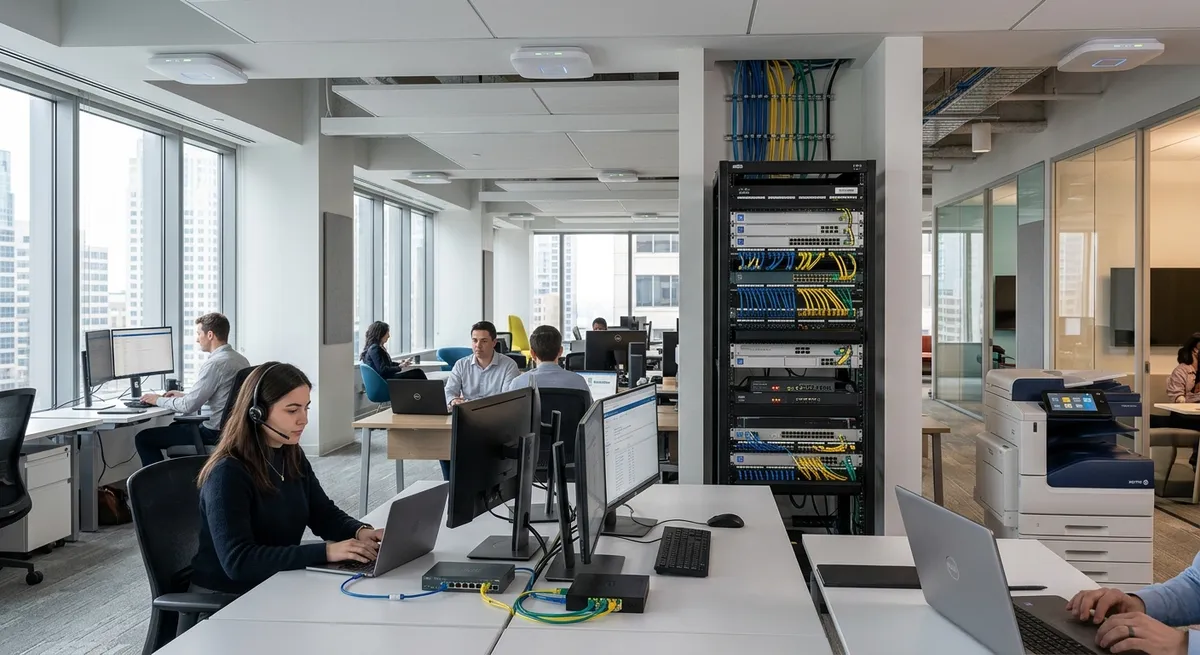
The parts nobody sees, done properly.
Cabling is easy to overlook, but it’s the one part of your network that should last for years. We install it right first time, label everything, and leave you with a comms cabinet you’re not embarrassed to open.
- Cat6A data cabling
- Fibre links between floors and buildings
- Comms cabinet builds and refreshes
- Wireless surveys and access point installs
- Switches, gateways and firewalls
- Patch panels, labelling and documentation
- Better performance and stability
- Faster troubleshooting when something does go wrong
- Better airflow and less strain on equipment
- A professional finish your team and visitors will notice
Keep running when the power doesn’t.
A storm, a tripped breaker or a dip in the supply can take your whole office offline — and a hard power loss can corrupt data and damage equipment. A UPS (uninterruptible power supply) bridges the gap.
Ride out power cuts
Battery power keeps your network, phones and servers running through short outages and flickers.
Shut down safely
In a longer outage, equipment powers down in order instead of crashing — no corrupted files or failed restarts.
Surge & spike protection
Absorbs surges and voltage dips before they reach your equipment, so expensive kit lasts longer.
Monitored with your network
Battery health, load and power events show up alongside the rest of your UniFi network — we know before a battery fails.
Survey. Design. Install. Manage.
Every project starts with a proper site survey and ends with documented, monitored infrastructure.
Book a site survey →- 1
Site survey
We walk the building, check existing cabling and kit, and measure Wi-Fi coverage where it matters.
- 2
Design
A network designed around how your team works — coverage, capacity, VLANs and room to grow.
- 3
Install
Cabling, cabinet and UniFi equipment installed, labelled and documented. Cut-overs planned to avoid disruption.
- 4
Manage
Monitored, updated and supported by us, so it stays as good as the day it went in.
Why Ubiquiti UniFi rather than the router our broadband provider gave us?
An ISP router is built for a home: one box, basic Wi-Fi, little control and no visibility. UniFi gives you business-grade gateways, switches and access points that work as one system — proper Wi-Fi coverage and roaming, separate networks for guests and phones, a real firewall, and remote management so we can support it without a site visit.
Our Wi-Fi is slow in parts of the office. Can you fix it?
Usually, yes. Dead spots and slow Wi-Fi tend to come from too few access points, poor placement, or everything sharing one crowded network. We survey the building, then place and configure access points so coverage and capacity match how the space is actually used.
Can visitors use our Wi-Fi without getting onto our network?
Yes. We set up a separate guest network, isolated from your business systems, with its own login page if you want one. Guests get internet access and nothing else. We’ve written more about getting guest Wi-Fi right.
Can you connect our other office and people working from home?
Yes. Sites can be linked with secure site-to-site VPNs so they work as one network, and remote staff connect over a secure VPN to the systems they need.
Do you only work with Ubiquiti?
UniFi is our first choice for most businesses, but we also work with Fortinet and MikroTik, and with equipment you already have. We specify what’s right for your size and budget, not what earns the biggest margin.
Do we really need a UPS?
If losing power for even a few minutes would stop your team working, yes. A UPS keeps your network, phones and servers running through short outages, shuts equipment down safely in longer ones, and protects it from surges. We fit the UniFi UPS 2U in your comms cabinet and monitor its battery with the rest of your network.
What happens if part of the network goes down?
Your network is monitored, so if a gateway, switch or access point drops offline we get an alert straight away. Most issues can be fixed remotely; if not, we come to you. Because everything is documented and labelled, fixes are quicker.


Ready to simplify your IT?
Talk to our team about where your business is today and where you want it to be. We reply the same business day.
- Phone
- +353 1 8733588