
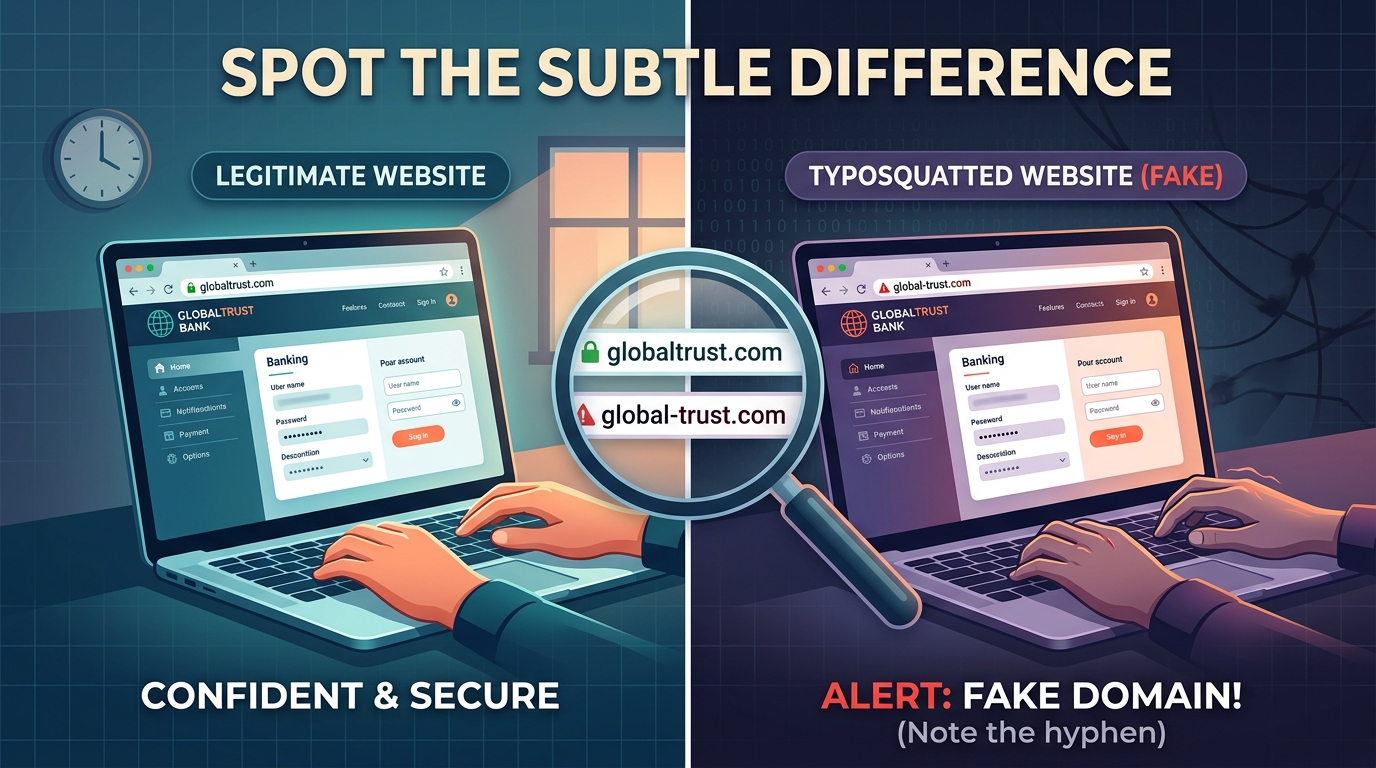
From the Frontlines: How We Stopped a Real Typosquatting Scam
In a recent investigation handled by our cybersecurity team, an external client received what looked like a routine update on an ongoing transaction. Attached to the email was a revised invoice requesting that payment be sent to an updated bank account.
At first glance, the sender appeared to be an executive the client worked with regularly. However, when our SOC team analyzed the email headers and infrastructure, the attack vector became clear:
- The Impersonation Trick: The attacker didn’t breach our client’s or the executive’s Microsoft 365 environment. Instead, they registered a typosquatted lookalike domain (
-ie.cominstead of.ie)to impersonate leadership. - The Payload: They injected themselves into an active thread and attached an altered invoice, swapping valid domestic bank details for an overseas account.
- The Resolution: We audited the tenant’s M365 authentication logs (confirming zero internal account compromise), executed an immediate domain takedown request with the registrar, and implemented tenant-wide anti-impersonation rules before any funds were released.
What Exactly is Typosquatting?
Typosquatting is a form of social engineering where an attacker registers a web domain that is visually or phonetically similar to a legitimate brand or target organisation.
The attacker uses this lookalike domain to launch Business Email Compromise (BEC) attacks, impersonate key executives, or set up fake login portals.
Common Typosquatting Patterns
Attackers use specific algorithmic tricks to generate deceptive domains:
- Hyphen Insertion or Removal: Adding or removing a dash in a domain (e.g., using
company-inc.cominstead ofcompanyinc.com). - Character Substitution (Homoglyphs): Swapping visually identical characters, such as replacing
lwith1, orOwith0(e.g.,micr0soft.com). - TLD Swapping: Switching out extensions (e.g., registering
.coor.orgwhen the real business uses.com). - Omission or Transposition: Missing a letter when typing fast or flipping adjacent letters (e.g.,
appel.com).
How to Spot a Typosquatted Domain
While typosquats are designed to fly under the radar, you can train your team to catch them:
1. Hover Before You Click
Always hover over hyperlinks in emails to reveal the actual destination address. If the display text says Microsoft Support but points to support-micr0soft.com, do not click.
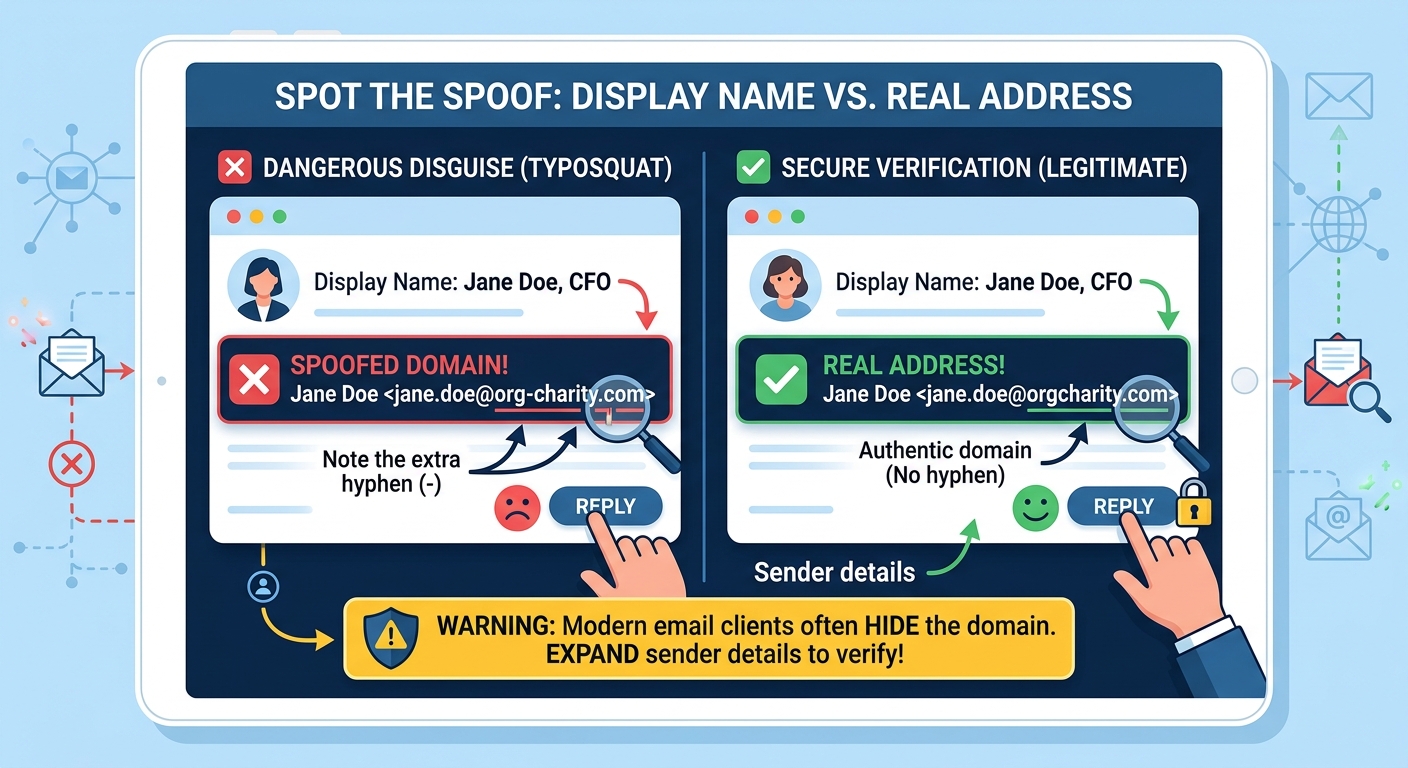
2.Check Display Name vs. Real Email Address
Modern email apps often emphasise the sender’s Display Name while hiding the real domain. Expand sender details to inspect the address closely.
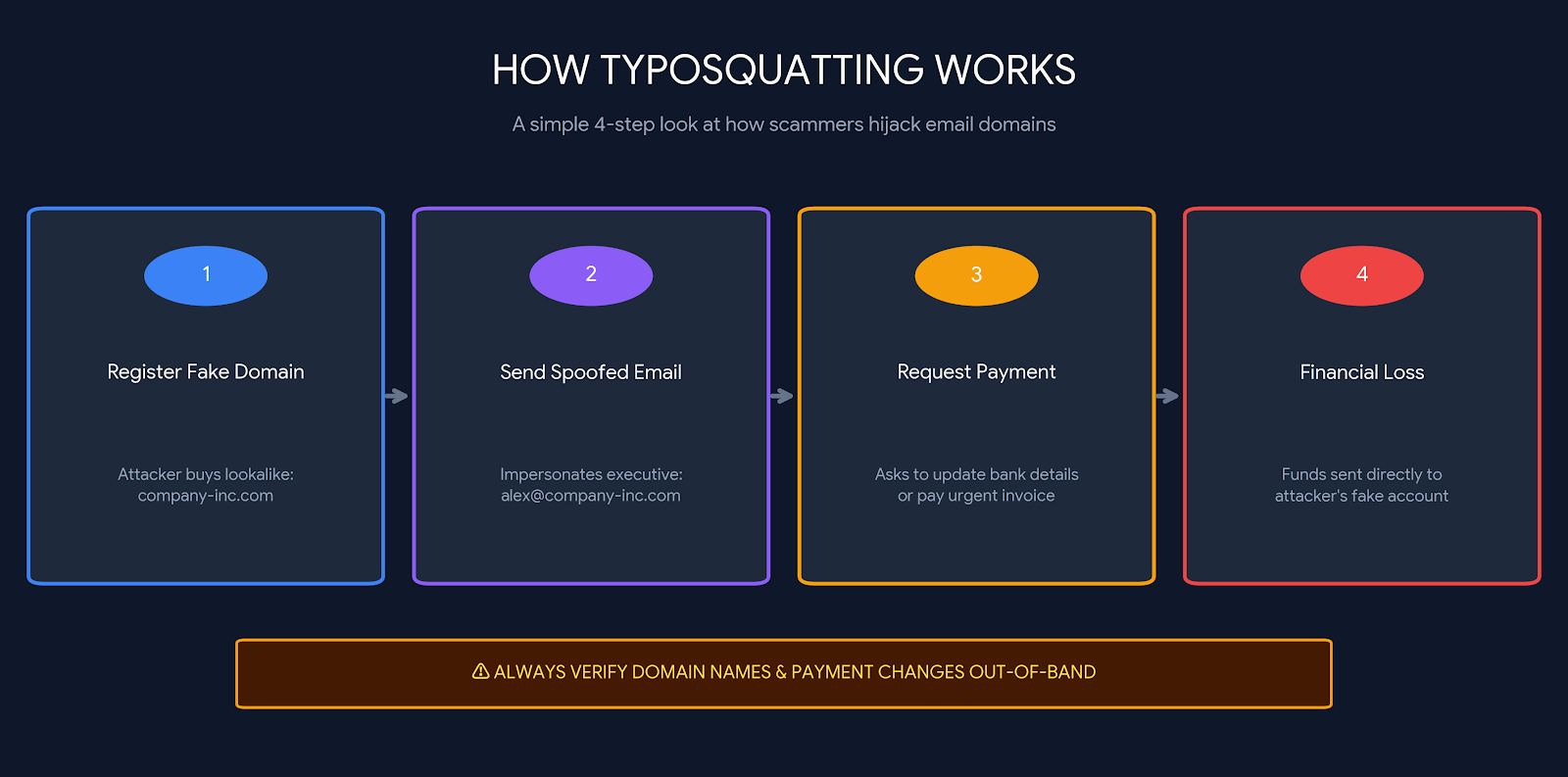
Typosquatted domains are rarely registered just to squat passively; they are active weapons:
- Executive & Vendor Impersonation (BEC): An attacker registers a domain mimicking a partner company, inserts themselves into an existing email thread, and requests an “urgent bank detail change” on an invoice.
- Credential Harvesting: Setting up a mirror image of a Microsoft 365 or Google Workspace login page on a typosquatted domain to harvest passwords and MFA tokens.
- Malware Delivery: Hosting malicious scripts or drive-by downloads disguised as software updates.
How to Spot a Typosquatted Domain
While typosquats are designed to fly under the radar, you can train your eye—and your team—to catch them before clicking or replying.
1. Hover Before You Click
Always hover your cursor over hyperlinks in emails to reveal the actual destination address. If the display text says Microsoft Support, but hovering reveals support-micr0soft.com, do not click.
2. Compare the Display Name vs. Full Email Address
Modern email clients often emphasise the sender’s Display Name (e.g., “Jane Doe, CFO”) while hiding the exact email domain. Expand the sender details to verify the exact domain suffix.
3. Verify Payment Changes Out-of-Band
As we saw in our customer investigation, scammers use typosquatted domains specifically to swap banking details on invoices. Always confirm any change in payment instructions via a direct phone call to a known number—never by replying to the email.
How We Help Protect Your Organisation
Stopping typosquats requires a mix of automated protection and rapid incident response:
- M365 & Security Gateway Audits: We configure anti-impersonation rules and Exchange transport filters to intercept lookalike domains.
- Proactive Domain Monitoring: We scan registrars for newly created domains mimicking your brand name.
- Takedown Enforcement: When a lookalike domain targets your business, our team handles fast-track abuse reporting with DNS registrars and hosters to take the malicious infrastructure offline.
4. Check for External Email Banners
Ensure your email system displays warning headers for external messages. If an email claims to come from an internal colleague but carries an [EXTERNAL] tag, inspect the domain immediately—it is likely a typosquat.
5. Look for Urgent Financial Requests
Typosquatting attacks almost always rely on artificial urgency (e.g., “Payment needed today,” “Account suspended”). Any request to alter payment methods or banking details must be verified out-of-band (via a known, direct phone call—never by replying to the email).
How Organisations Can Protect Themselves
Proactive Domain Monitoring: Use tools like DNSTwist or commercial domain monitoring services to scan registrars for newly created domains containing your brand name.
Defensive Registrations: Register common misspellings, hyphenated variants, and alternate TLDs (.net, .co, .org) for your primary domain and redirect them to your main website.
Strict Anti-Impersonation Rules: Set up Exchange Transport Rules or email security gateway filters to flag inbound emails where the display name matches internal leadership but originates from an external domain.
Submit Fast Takedowns: When a typosquatted domain targeting your brand is identified, file an immediate abuse complaint with the domain’s registrar (e.g., Namecheap, GoDaddy) and DNS hosting providers (e.g., Cloudflare) to have it shut down.
Need Help Securing Your Environment?
If you suspect an email impersonation attempt or want to audit your domain defenses, reach out to our cybersecurity team today.