No More “Did That Email Get Through?”
For years, support requests could arrive in all sorts of places—an inbox, a mobile number, a text message, WhatsApp, or even a missed phone call. It wasn’t always easy to see where things stood.
Our new Customer Support Portal changes that.
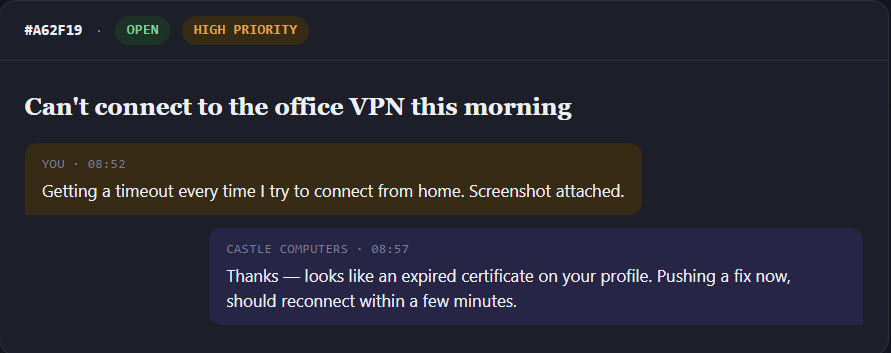
Every support request now has a permanent home: a ticket with its own reference number, current status, and complete conversation history. You can check progress whenever you like, without needing to ask for an update.
Built Around How You’ll Actually Use It
Password-Free Access
Forget passwords and password resets.
Sign in securely using a one-time link sent to your email address. Nothing to remember, nothing to lose.
Raise a Ticket in Under a Minute
Getting help shouldn’t take longer than the problem itself.
Simply:
- Describe the issue
- Attach a screenshot (if helpful)
- Click Submit
Your request is immediately routed to the right engineer and prioritised.
Everything in One Conversation
Every update stays together.
You’ll always be able to see:
- Current ticket status
- Full conversation history
- Engineer replies
- Attachments
You’ll also continue receiving updates by email, so you can reply exactly as you do today.
Try This First
Many common issues have a quick fix.
Before you even submit a ticket, we’ll automatically suggest:
- Known solutions
- Simple troubleshooting steps
- Relevant knowledge base articles
Sometimes a 30-second fix is all that’s needed.
Know What’s Included
Need to check what’s covered?
The portal lets you quickly see:
- Your support agreement
- What’s included
- Out-of-scope work
- Your account manager
Everything is available at a glance.
Works Anywhere
Whether you’re:
- In the office
- Working from home
- Travelling
The portal works perfectly on desktop, tablet, and mobile.
Raise a ticket or check its progress wherever you are.
Tips for Getting the Most From the Portal
Make the Portal Your First Stop
Creating a ticket is usually faster than composing an email—and you’ll see updates the moment they happen.
Check for a Quick Fix First
The New Ticket page includes Try This First suggestions and a live search of our knowledge base.
For routine issues, the answer may already be waiting.
Give Us the Full Picture
The more information we have, the faster we can help.
A clear description and a screenshot often save several rounds of follow-up questions.
If we don’t have enough information to begin working on the issue, the portal will ask for a little more detail before your ticket is submitted.
Prefer Email? That’s Fine Too.
Email us at:
support@support.castlecomputers.ie
Every email automatically creates a ticket, and replying to any ticket notification keeps the entire conversation together in one place.
Check Progress Without Chasing
Wondering where things stand?
Simply open the portal to see:
- Current status
- Latest engineer update
- Full history
- Any actions waiting for you
No need to send a separate “just checking” email.
One Small Favour
To help us provide the fastest and most reliable service, please send all new support requests through either:
- The Customer Support Portal
- support@support.castlecomputers.ie
Rather than personal inboxes or mobile numbers.
This ensures every request is logged, tracked, and visible to the whole support team—even if someone is away from the office.
Better visibility. Faster responses. Nothing gets missed.